Wednesday, October 14, 2026
  • News
    • Latest News
    • Breaking News
    • Fact Check
    • Investigations
    • Explainers
  • Politics
    • Global Politics
    • Elections
    • Government & Policy
    • Diplomacy
    • Conflicts & Security
    • Political Analysis
  • Business
    • Global Economy
    • Markets
    • Technology
    • Startups
    • Energy
    • Finance
  • World News
    • Americas
    • Asia
    • Asia Pacific
    • Africa
    • Europe
    • Middle East
  • Africa
    • Central Africa
    • East Africa
    • West Africa
    • Southern Africa
  • Health
    • Global Health
    • Public Health
    • Health Policy
    • Medical Research
    • Diseases & Conditions
    • Mental Health
    • Nutrition
    • Climate & Health
    • Health Explainers
  • Sports
    • World Cup 2026
    • Athletics
    • Basketball
    • Boxing
    • Cricket
    • Football
    • Formula 1
    • Golf
    • Rugby
  • Weather
    • Climate Business
    • Climate Change
    • Climate Solutions
    • Living Green
  • Culture
    • Arts
    • Film & TV
    • Food and Recipes
    • Music
    • Lifestyle
    • People
    • Travel
  • Opinion
    • Editorials
    • Letters
  • Behind The Brand
REGISTER
LOGIN
No Result
View All Result
The Kenya Times
  • News
    • Latest News
    • Breaking News
    • Fact Check
    • Investigations
    • Explainers
  • Politics
    • Global Politics
    • Elections
    • Government & Policy
    • Diplomacy
    • Conflicts & Security
    • Political Analysis
  • Business
    • Global Economy
    • Markets
    • Technology
    • Startups
    • Energy
    • Finance
  • World News
    • Americas
    • Asia
    • Asia Pacific
    • Africa
    • Europe
    • Middle East
  • Africa
    • Central Africa
    • East Africa
    • West Africa
    • Southern Africa
  • Health
    • Global Health
    • Public Health
    • Health Policy
    • Medical Research
    • Diseases & Conditions
    • Mental Health
    • Nutrition
    • Climate & Health
    • Health Explainers
  • Sports
    • World Cup 2026
    • Athletics
    • Basketball
    • Boxing
    • Cricket
    • Football
    • Formula 1
    • Golf
    • Rugby
  • Weather
    • Climate Business
    • Climate Change
    • Climate Solutions
    • Living Green
  • Culture
    • Arts
    • Film & TV
    • Food and Recipes
    • Music
    • Lifestyle
    • People
    • Travel
  • Opinion
    • Editorials
    • Letters
  • Behind The Brand
  • News
    • Latest News
    • Breaking News
    • Fact Check
    • Investigations
    • Explainers
  • Politics
    • Global Politics
    • Elections
    • Government & Policy
    • Diplomacy
    • Conflicts & Security
    • Political Analysis
  • Business
    • Global Economy
    • Markets
    • Technology
    • Startups
    • Energy
    • Finance
  • World News
    • Americas
    • Asia
    • Asia Pacific
    • Africa
    • Europe
    • Middle East
  • Africa
    • Central Africa
    • East Africa
    • West Africa
    • Southern Africa
  • Health
    • Global Health
    • Public Health
    • Health Policy
    • Medical Research
    • Diseases & Conditions
    • Mental Health
    • Nutrition
    • Climate & Health
    • Health Explainers
  • Sports
    • World Cup 2026
    • Athletics
    • Basketball
    • Boxing
    • Cricket
    • Football
    • Formula 1
    • Golf
    • Rugby
  • Weather
    • Climate Business
    • Climate Change
    • Climate Solutions
    • Living Green
  • Culture
    • Arts
    • Film & TV
    • Food and Recipes
    • Music
    • Lifestyle
    • People
    • Travel
  • Opinion
    • Editorials
    • Letters
  • Behind The Brand
No Result
View All Result
The Kenya Times ~ Trending, Breaking News and Videos
No Result
View All Result
ADVERTISEMENT

How to Add or Remove Dependents on Your SHA Account

Jason NdunyubyJason Ndunyu
September 13, 2025
Reading Time: 5 mins read
How To Add Or Remove Dependents On Your Sha Account

The Social Health Authority (SHA) portal. PHOTO/Afyangu

FacebookTwitterLinkedInRedditWhatsApp
Advertisement

The Social Health Authority (SHA) helps members manage their family’s healthcare coverage by allowing them to easily add or remove dependents on their profile.

This ensures that a member’s loved ones can access essential medical services under your coverage.

Below is a step-by-step guide that will help you navigate the SHA portal, from logging in to successfully adding and verifying dependents—all from the convenience of your device.

Access Your SHA profile

  • Visit the official SHA website: https://sha.go.ke
  • Log in using your National ID number and password.

Go to the Dependents section

  • After logging in, click on the “My Profile” tab.
  • Select “Dependents” to view or manage your dependent list.

Add a new dependent

  • Click the “Add Dependent” button.
  • Select the relationship type:
    • Spouse
    • Biological Child
    • Adopted Child
    • Child under Loco Parentis (a child under your legal guardianship)

Enter dependent details

For a spouse:

ADVERTISEMENT
  • Upload proof of marriage (e.g., marriage certificate, affidavit, or letter from the chief).
  • Provide your spouse’s phone number—an OTP (One-Time Password) will be sent to them for consent.

For a biological child:

  • Under 18: Enter the birth certificate number or birth notification reference number.
  • 18 or older: Enter their National ID number.
  • Aged 21–25: Upload proof of school enrolment.
  • Over 25: Only allowed if the child has a disability and is under your care.

Also Read: How to Access SHA Services as a Self-Employed Individual


For an adopted child:

  • Upload adoption documents.
  • Over 21: Also provide proof of school enrolment.

For a child under loco parentis:

  • Upload court documents proving guardianship.
  • Follow the same age-related requirements as for biological children.

Upload supporting documents

  • Upload all required documents based on the dependent’s relationship type and age.
  • Ensure all documents are clear and valid to avoid delays.

Confirm and save

  • Review all entered details for accuracy.
  • Click “Save” to submit the information.
  • A confirmation message will appear once the dependent has been successfully added.

Wait for verification

ADVERTISEMENT
  • SHA will verify the information and documents submitted.
  • You will receive a notification once the dependent is successfully verified.

Also Read: How to Verify Status of Your SHA Contributions Online


Removing a dependent

To remove a dependent, go to the “Dependents” section of your SHA profile, select the dependent you wish to remove, then click “Remove”, and confirm your choice. You can add or remove dependents at any time via your SHA account.

Always double-check all entries before submitting and uploading all supporting documents to avoid delays. For assistance, visit the SHA support page or contact their helpdesk.

Ensuring your dependents are correctly listed and verified on your SHA profile is key to giving them uninterrupted access to healthcare services.

Follow our WhatsApp Channel and X Account for real-time news updates.

How To Add Or Remove Dependents On Your Sha Account
Clients walking towards the newly rebranded Social Health Authority (SHA) building on October 1, 2024, as the government officially rolled out the healthcare service provider. PHOTO/NMG
Tags: DependentsSHASHA DependentsSocial Health Authority
Jason Ndunyu

Jason Ndunyu

Jason Ndunyu is a Digital News Journalist, holding a Mass Communications degree from Maseno University. He combines a keen eye for detail with rigorous research and factchecking, producing content that is both accurate and compelling. Jason covers a wide range of topics, with a particular passion for the fast-paced and ever-evolving world of Sports, where he explores stories that inform, entertain, and engage audiences across digital platforms.

Related Posts

Kcse 2026 Timetable: Examination Dates And Times For All Papers

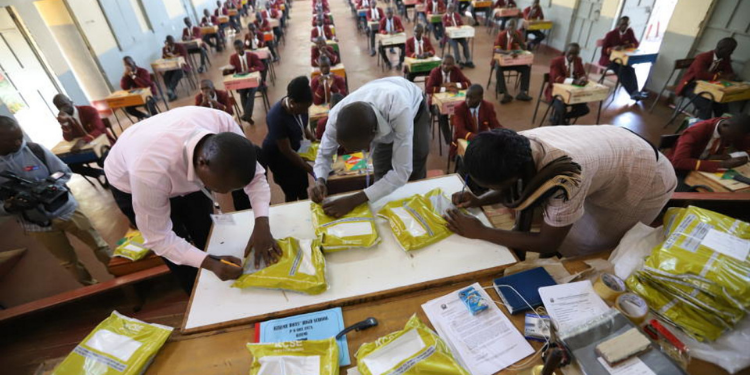
KCSE 2026 Timetable: Date and Time Each Paper Will Be Examined

October 14, 2026
Phone Snatchers Arrested, 57 Recovered After Iphone 15 Pro Max Theft Along Limuru Road

Motorist Jumps Out of Car, Recovers iPhone 15 Pro Max After Police Chase

October 14, 2026
Safaricom Responds To Customer Reports Of Endless Messages, Automatic Credit And Minute Purchases

Safaricom Issues Response After Customers Report Unusual Phone Activity

October 14, 2026
Kenyan Mp Wins Global Award

Kenyan MP Wins Global Award

October 14, 2026
ADVERTISEMENT

The Kenya Times Facebook

LATEST NEWS

  • KCSE 2026 Timetable: Date and Time Each Paper Will Be Examined
  • Bobby Ogolla: How Gor Mahia’s ‘Six Million Dollar Man’ Made His Name
  • Motorist Jumps Out of Car, Recovers iPhone 15 Pro Max After Police Chase
  • Fastest Routes to Get From JKIA to Nairobi CBD
  • UDA Secretary General Hassan Omar Summoned
  • Safaricom Issues Response After Customers Report Unusual Phone Activity
  • Kenyan MP Wins Global Award
  • Profile of Esther Arunga, Former KTN Anchor Who Dropped Husband’s Surname After 16 Years
  • How Mamlaka Hill Chapel Grew From 80 Worshippers Under Bishop Ng’ang’a Before His Dismissal
  • Why SRC Asked 2 Senior Judges to Step Aside From High-Profile Car Allowance Case
  • India Issues Kenya Travel Advisory Over New Entry Requirement
  • Can You Drop Your Ex-Husband’s Name After Divorce in Kenya? What the Law Says
  • Dangote’s Lamu Refinery: Beyond Political Praise, Where Is the Business Case?
  • DCI Extends Same-Day Police Clearance Certificates to Diplomats and Foreign Nationals
  • Gachagua Hints at Fuel Price Increase Ahead of EPRA Review
ADVERTISEMENT

Company

About Us

Our Authors

Our Experts

Social Media

Policies

Privacy Policy

House Rules

Standards and Policies

Terms and Conditions

Subscription

My Account

Contact Us

Contact Us

Join Our Team

Advertise With Us

© Copyright 2026 | The Kenya Times | All Rights Reserved

Welcome Back!

Sign In with Facebook
Sign In with Google
Sign In with Linked In
OR

Login to your account below

Forgotten Password? Sign Up

Create New Account!

Sign Up with Facebook
Sign Up with Google
Sign Up with Linked In
OR

Fill the forms below to register

All fields are required. Log In

Retrieve your password

Please enter your username or email address to reset your password.

Log In
Your Privacy and Cookies
We use cookies on our website to give you the most relevant experience by remembering your preferences and repeat visits. By clicking “Accept”, you consent to the use of ALL the cookies.
Do not sell my personal information.
Cookie settingsACCEPT
Privacy & Cookies Policy

Privacy Overview

This website uses cookies to improve your experience while you navigate through the website. Out of these cookies, the cookies that are categorized as necessary are stored on your browser as they are essential for the working of basic functionalities of the website. We also use third-party cookies that help us analyze and understand how you use this website. These cookies will be stored in your browser only with your consent. You also have the option to opt-out of these cookies. But opting out of some of these cookies may have an effect on your browsing experience.
Necessary
Always Enabled
Necessary cookies are absolutely essential for the website to function properly. This category only includes cookies that ensures basic functionalities and security features of the website. These cookies do not store any personal information.
Functional
Functional cookies help to perform certain functionalities like sharing the content of the website on social media platforms, collect feedbacks, and other third-party features.
Performance
Performance cookies are used to understand and analyze the key performance indexes of the website which helps in delivering a better user experience for the visitors.
Analytics
Analytical cookies are used to understand how visitors interact with the website. These cookies help provide information on metrics the number of visitors, bounce rate, traffic source, etc.
Advertisement
Advertisement cookies are used to provide visitors with relevant ads and marketing campaigns. These cookies track visitors across websites and collect information to provide customized ads.
Others
Other uncategorized cookies are those that are being analyzed and have not been classified into a category as yet.
SAVE & ACCEPT
LOGIN | REGISTER
  • Login
  • Sign Up
  • Cart
No Result
View All Result
  • News
    • Latest News
    • Breaking News
    • Investigations
    • Explainers
    • Fact Check
  • Politics
    • Global Politics
    • Conflicts & Security
    • Elections
    • Diplomacy
    • Government & Policy
    • Political Analysis
  • Business
    • Global Economy
    • Markets
    • Technology
    • Startups
    • Energy
    • Finance
  • World News
    • Americas
    • Asia
    • Asia Pacific
    • Africa
    • Europe
    • Middle East
  • Africa
    • East Africa
    • West Africa
    • Southern Africa
    • Central Africa
  • Health
    • Global Health
    • Public Health
    • Health Policy
    • Medical Research
    • Diseases & Conditions
    • Mental Health
    • Nutrition
    • Climate & Health
    • Health Explainers
  • Sports
    • World Cup 2026
    • Athletics
    • Basketball
    • Boxing
    • Cricket
    • Football
    • Formula 1
    • Golf
    • Rugby
  • Weather
    • Climate Business
    • Climate Change
    • Climate Solutions
    • Living Green
  • Culture
    • Arts
    • Film & TV
    • Food and Recipes
    • Lifestyle
    • Music
    • People
    • Travel
  • Opinion
    • Editorials
    • Letters
  • Behind The Brand
  • Contact Us

Not enough quota to unlock this post
Unlock left : 0
Are you sure want to cancel subscription?