
Saturday, August 29, 2026
  • News
    • Latest News
    • Breaking News
    • Fact Check
    • Investigations
    • Explainers
  • Politics
    • Global Politics
    • Elections
    • Government & Policy
    • Diplomacy
    • Conflicts & Security
    • Political Analysis
  • Business
    • Global Economy
    • Markets
    • Technology
    • Startups
    • Energy
    • Finance
  • World News
    • Americas
    • Asia
    • Asia Pacific
    • Africa
    • Europe
    • Middle East
  • Africa
    • Central Africa
    • East Africa
    • West Africa
    • Southern Africa
  • Health
    • Global Health
    • Public Health
    • Health Policy
    • Medical Research
    • Diseases & Conditions
    • Mental Health
    • Nutrition
    • Climate & Health
    • Health Explainers
  • Sports
    • World Cup 2026
    • Athletics
    • Basketball
    • Boxing
    • Cricket
    • Football
    • Formula 1
    • Golf
    • Rugby
  • Weather
    • Climate Business
    • Climate Change
    • Climate Solutions
    • Living Green
  • Culture
    • Arts
    • Film & TV
    • Food and Recipes
    • Music
    • Lifestyle
    • Travel
  • Opinion
    • Editorials
    • Letters
  • Behind The Brand
REGISTER
LOGIN
No Result
View All Result
The Kenya Times
  • News
    • Latest News
    • Breaking News
    • Fact Check
    • Investigations
    • Explainers
  • Politics
    • Global Politics
    • Elections
    • Government & Policy
    • Diplomacy
    • Conflicts & Security
    • Political Analysis
  • Business
    • Global Economy
    • Markets
    • Technology
    • Startups
    • Energy
    • Finance
  • World News
    • Americas
    • Asia
    • Asia Pacific
    • Africa
    • Europe
    • Middle East
  • Africa
    • Central Africa
    • East Africa
    • West Africa
    • Southern Africa
  • Health
    • Global Health
    • Public Health
    • Health Policy
    • Medical Research
    • Diseases & Conditions
    • Mental Health
    • Nutrition
    • Climate & Health
    • Health Explainers
  • Sports
    • World Cup 2026
    • Athletics
    • Basketball
    • Boxing
    • Cricket
    • Football
    • Formula 1
    • Golf
    • Rugby
  • Weather
    • Climate Business
    • Climate Change
    • Climate Solutions
    • Living Green
  • Culture
    • Arts
    • Film & TV
    • Food and Recipes
    • Music
    • Lifestyle
    • Travel
  • Opinion
    • Editorials
    • Letters
  • Behind The Brand
  • News
    • Latest News
    • Breaking News
    • Fact Check
    • Investigations
    • Explainers
  • Politics
    • Global Politics
    • Elections
    • Government & Policy
    • Diplomacy
    • Conflicts & Security
    • Political Analysis
  • Business
    • Global Economy
    • Markets
    • Technology
    • Startups
    • Energy
    • Finance
  • World News
    • Americas
    • Asia
    • Asia Pacific
    • Africa
    • Europe
    • Middle East
  • Africa
    • Central Africa
    • East Africa
    • West Africa
    • Southern Africa
  • Health
    • Global Health
    • Public Health
    • Health Policy
    • Medical Research
    • Diseases & Conditions
    • Mental Health
    • Nutrition
    • Climate & Health
    • Health Explainers
  • Sports
    • World Cup 2026
    • Athletics
    • Basketball
    • Boxing
    • Cricket
    • Football
    • Formula 1
    • Golf
    • Rugby
  • Weather
    • Climate Business
    • Climate Change
    • Climate Solutions
    • Living Green
  • Culture
    • Arts
    • Film & TV
    • Food and Recipes
    • Music
    • Lifestyle
    • Travel
  • Opinion
    • Editorials
    • Letters
  • Behind The Brand
No Result
View All Result
The Kenya Times ~ Trending, Breaking News and Videos
No Result
View All Result
ADVERTISEMENT

How to Confirm the Progress of Your NEMA Permit Application

Wiltord OtienobyWiltord Otieno
October 7, 2025
Reading Time: 6 mins read
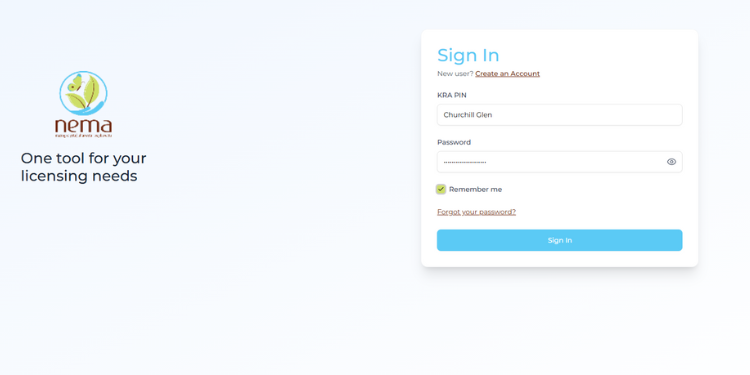
How To Check The Status Of Your Nema Permit Online

NEMA online portal. PHOTO/Obat

FacebookTwitterLinkedInRedditWhatsApp
Advertisement

The National Environment Management Authority (NEMA) permit is a crucial document for individuals and organizations undertaking projects that may impact Kenya’s environment.

The new online tracking system, integrated into the eCitizen platform and the NEMA Environmental Licensing Portal (ENVIS), offers applicants real-time updates on the review and approval process for various permits, including Environmental Impact Assessments (EIA), waste transportation, emission licenses, and other compliance certifications.

How to Check Your NEMA Permit Status

1. Visit the Official NEMA Licensing Portal

Begin by opening the National Environment Management Authority (NEMA) Licensing Portal through your web browser, on https://licensing.nema.go.ke.

This is the central platform where all environmental licenses, permits, and authorizations are processed and tracked.

It allows you to submit new applications, make payments, and check the current status of any pending request.

If your application was made through eCitizen, you can also access the same services by logging into https://www.ecitizen.go.ke and selecting the NEMA service tab.

ADVERTISEMENT

Both platforms are officially managed by the Authority and offer real-time updates on your application.

2. Log In Using Your Account Credentials

Once you are on the NEMA Licensing Portal or the eCitizen platform, proceed to log in using the same credentials you used during your application.

If your permit application was submitted through eCitizen, select “National Environment Management Authority (NEMA)” from the list of government services after logging into your eCitizen dashboard.

The system will automatically link to your previous submissions.

For those who applied directly through licensing.nema.go.ke, enter your username, email address, or ID number, followed by your password.

Ensure that your login information is accurate to avoid being locked out after multiple failed attempts.

ADVERTISEMENT

For security, never share your password and always log out after completing your session, especially when using a public or shared computer.

3. Locate the “My Applications” or “Track Application” Section

After successfully logging in, navigate to the section labeled “My Applications”, “Track Application”, or “Application Status”, depending on the version of the portal you are using.

This section contains a detailed list of all your submitted applications, including environmental impact assessments, waste management licenses, emission permits, and other NEMA authorizations.

Each entry will display a unique reference or tracking number, the type of permit, the date of submission, and the current review status.

If you submitted your documents through eCitizen, your NEMA application should appear under the “Submitted Applications” tab.

Click on the relevant permit to open a more detailed view, showing whether it is under review, queried, approved, or issued.

4. Enter Your Application Reference Number

Within the tracking or verification section, locate the search or input field labeled “Application Reference Number”, “Tracking ID”, or “Permit Number.”

This is the unique identifier assigned to your application at the time of submission.

You can find this number on your acknowledgment receipt, payment confirmation, or email notification from NEMA. It typically follows a structured format combining letters and numbers (for example, NEMA/EIA/XXXX/2025).

Enter the reference number carefully to avoid errors, then click “Search,” “Track,” or “Verify.”

The system will automatically retrieve and display the most recent update on your permit’s progress.

5. Review Your Application Status and Take Necessary Action

Once the system retrieves your record, the portal will display the current status of your NEMA permit application.

The results page usually includes details such as the permit type, submission date, review stage, and any official remarks from NEMA officers.

Common status updates include:

  • Received: Your application has been successfully submitted and is awaiting review.
  • Under Review: NEMA’s technical team is currently assessing your documents.
  • Queried: Additional information or clarification is required; you must log in, read the remarks, and upload the requested documents promptly.
  • Approved/Issued: Your permit has been granted and is available for download in PDF format.
  • Rejected: Your application did not meet certain criteria; the remarks section will explain the reason.

If your application is queried, respond immediately through the same portal; delays in addressing these queries can often slow down the approval process.

For an approved NEMA permit, download and save the official document for record-keeping and future compliance inspections.


Also Read: Complete Guide on How to Apply for a Forestry Permit from NEMA


In the event of technical issues, missing updates, or unclear feedback, please contact the NEMA Licensing Helpdesk using the contact information provided on the portal.

Always include your reference number in your inquiry to ensure faster assistance.

6. Download and Safely Store Your Approved Permit

If your application status shows “Approved” or “Issued”, proceed to download your official NEMA permit directly from the portal.

Look for a button or link labeled “Download Permit”, “View License,” or “Print Certificate.”

The document is typically provided in PDF format, bearing NEMA’s official logo, serial number, and digital authentication mark for verification.

Before downloading, double-check that all details, including your name, project title, permit number, and validity period, are correct.

Any discrepancies should be reported immediately to the NEMA Licensing Office for rectification.


Also Read: Step-by-Step Process of Renewing Your EIA License in Kenya


Once verified, save the NEMA permit to a secure digital location, such as a dedicated company folder or cloud storage service, and print a physical copy for on-site display if required by environmental regulations.

Keeping multiple copies ensures you remain compliant during inspections, renewals, or audits.

NEMA advises all permit holders to avoid altering, laminating, or sharing the digital document on unofficial platforms to prevent misuse.

Follow our WhatsApp Channel and X Account for real-time news updates.

How To Check The Status Of Your Nema Permit Online
The National Environment Management Authority (NEMA) permit is a crucial document for individuals and organisations undertaking projects that may impact Kenya’s environment. PHOTO/environmentworld
Tags: NEMANEMA Permit
Wiltord Otieno

Wiltord Otieno

Wiltord Otieno is a passionate journalist at The Kenya Times with a keen eye for impactful stories. He specializes in sports writing, digital content, and storytelling that informs and inspires. Wiltord is driven by curiosity, delivering clear, engaging narratives that inform, challenge, and inspire audiences, and always ready to grow in this fast-evolving media landscape. He holds a Bachelor of Arts in Journalism and Mass Communication from The Technical University of Kenya. He can be reached at [email protected]

Related Posts

Felistus Kaveva

Kaptagat Cycling Challenge Unites Sport, Inclusion and Conservation

July 3, 2026
A Collage Of A Tortoise And The Jackson’s Three-Horned Chameleon At The Wild Photo/Arcadia Safaris

List of Most Exported Reptiles in Kenya

May 15, 2026
Principal Secretary For Forestry Gitonga Mugambi Congratulates Antoine Moses On His World Record Feat, Which Is Now Pending Ratification.

Antoine Moses Sets Historic Mangrove Record in Kenya as PS Gitonga Hails Feat

May 1, 2026
President William Ruto Launched Initiative To Increase Kenya'S Forest Cover With Cutting Of Trees Still Rampant

Opinion | Why the Destruction of Forests is an Existential Threat to Kenya’s Future

April 27, 2026
ADVERTISEMENT

The Kenya Times Facebook

LATEST NEWS

  • Trending Nail Designs 2026: Popular Styles from Chrome to Furry Nails
  • How Rosemary Koech Died: Sister Shares Her Final Journal Notes and Secrets
  • UEFA Champions League 2026/27 Fixtures: Full Schedule, Kick-Off Times and Where To Watch
  • Wilfred Musau: Serial Banker Who Has Worked for 5 Kenyan Banks and Now Joins NMG
  • Ruto Explains Why Kenyans Still Pay 1.5% Housing Levy After Wage Increase
  • How Nairobi’s Rail Network Will Move From CBD Underground Tunnels to Elevated Sections in Muthurwa
  • Women’s Volleyball Africa Championship Round of 16: Teams, Schedule and Kick-Off Times
  • Who Is Kevin Migwe Kimwatu? Rosemary Koech’s Husband at Centre of Burial Dispute
  • Govt to Introduce New Career Paths for Employees Seeking Promotion
  • Winnie Odinga Lifts Lid on Raila – Ruto Deal, Seeks Uhuru’s Advice
  • Kenya Among Eight Countries Set to Join Global Digital Cooperation Body
  • Kenya Airways Takes Top Spot in Africa with Four World Travel Awards
  • Why Kenya Never Finishes a Presidential Election 
  • Nairobi Hospital Announces New Changes to Its Board
  • Kenya Met Lists Areas to Receive Rain, Warns of Temperatures of Up to 38°C
ADVERTISEMENT

Company

About Us

Our Authors

Our Experts

Social Media

Policies

Privacy Policy

House Rules

Standards and Policies

Terms and Conditions

Subscription

My Account

Contact Us

Contact Us

Join Our Team

Advertise With Us

© Copyright 2026 | The Kenya Times | All Rights Reserved

Welcome Back!

Sign In with Facebook
Sign In with Google
Sign In with Linked In
OR

Login to your account below

Forgotten Password? Sign Up

Create New Account!

Sign Up with Facebook
Sign Up with Google
Sign Up with Linked In
OR

Fill the forms below to register

All fields are required. Log In

Retrieve your password

Please enter your username or email address to reset your password.

Log In
Your Privacy and Cookies
We use cookies on our website to give you the most relevant experience by remembering your preferences and repeat visits. By clicking “Accept”, you consent to the use of ALL the cookies.
Do not sell my personal information.
Cookie settingsACCEPT
Privacy & Cookies Policy

Privacy Overview

This website uses cookies to improve your experience while you navigate through the website. Out of these cookies, the cookies that are categorized as necessary are stored on your browser as they are essential for the working of basic functionalities of the website. We also use third-party cookies that help us analyze and understand how you use this website. These cookies will be stored in your browser only with your consent. You also have the option to opt-out of these cookies. But opting out of some of these cookies may have an effect on your browsing experience.
Necessary
Always Enabled
Necessary cookies are absolutely essential for the website to function properly. This category only includes cookies that ensures basic functionalities and security features of the website. These cookies do not store any personal information.
Functional
Functional cookies help to perform certain functionalities like sharing the content of the website on social media platforms, collect feedbacks, and other third-party features.
Performance
Performance cookies are used to understand and analyze the key performance indexes of the website which helps in delivering a better user experience for the visitors.
Analytics
Analytical cookies are used to understand how visitors interact with the website. These cookies help provide information on metrics the number of visitors, bounce rate, traffic source, etc.
Advertisement
Advertisement cookies are used to provide visitors with relevant ads and marketing campaigns. These cookies track visitors across websites and collect information to provide customized ads.
Others
Other uncategorized cookies are those that are being analyzed and have not been classified into a category as yet.
SAVE & ACCEPT
LOGIN | REGISTER
  • Login
  • Sign Up
  • Cart
No Result
View All Result
  • News
    • Latest News
    • Breaking News
    • Investigations
    • Explainers
    • Fact Check
  • Politics
    • Global Politics
    • Conflicts & Security
    • Elections
    • Diplomacy
    • Government & Policy
    • Political Analysis
  • Business
    • Global Economy
    • Markets
    • Technology
    • Startups
    • Energy
    • Finance
  • World News
    • Americas
    • Asia
    • Asia Pacific
    • Africa
    • Europe
    • Middle East
  • Africa
    • East Africa
    • West Africa
    • Southern Africa
    • Central Africa
  • Health
    • Global Health
    • Public Health
    • Health Policy
    • Medical Research
    • Diseases & Conditions
    • Mental Health
    • Nutrition
    • Climate & Health
    • Health Explainers
  • Sports
    • World Cup 2026
    • Athletics
    • Basketball
    • Boxing
    • Cricket
    • Football
    • Formula 1
    • Golf
    • Rugby
  • Weather
    • Climate Business
    • Climate Change
    • Climate Solutions
    • Living Green
  • Culture
    • Arts
    • Film & TV
    • Food and Recipes
    • Lifestyle
    • Music
    • Travel
  • Opinion
    • Editorials
    • Letters
  • Behind The Brand
  • Contact Us

Not enough quota to unlock this post
Unlock left : 0
Are you sure want to cancel subscription?